After 5 years, a select statement on a Oracle 10 database starts to fail...with the error message ORA-01722: Invalid Number.
Hum, strange error message and not really usefull.
I read lots of post and sometimes it was due to an issue with the connector (http://www.attunity.com/forums/microsoft-ssis-oracle-connector/known-limitation-number-fields-1305.html), due to datatype mismatch (http://social.msdn.microsoft.com/Forums/en/sqlintegrationservices/thread/9acb1c36-bfaf-40eb-bb6e-3a91eeea96ec) or due to other reasons.
In my case, the issue cames from a TO_NUMBER casting that we did to convert a string datatype to a number...I know it'sstupid to create keys as string but I'm not responsible of that ;-)
So let's continue the explanation...first I started to execute the query by removing all the selected fields.
The query ran fine.
Than I added, one by one the selected fields till the error occured again. Like this I was able to identify the column that caused the issue.
Second I remarked that I did a conversion using TO_NUMBER...May it be possible that some values in the source database are not numbers?
I executed again the query without converting the values and was able then to see that one row had the value 'PHONECALL' as key number! Very funny. So I have identified the bug.
Now go to the solution...
1) The workaround: adding a selection criteria in the where clause that avoid selecting rows where the values length is smaller than the expected length.
2) The solution: Asking to the DBA to create a function that detect if a value is a number or not like here follow:
CREATE OR REPLACE FUNCTION is_number
( p_str IN VARCHAR2 )
RETURN VARCHAR2
IS
l_num NUMBER;
BEGIN
l_num := to_number( p_str );
RETURN 'Y';
EXCEPTION
RETURN 'N';
END is_number;
Showing posts with label OLTP Database. Show all posts
Showing posts with label OLTP Database. Show all posts
Thursday, May 31, 2012


Tuesday, May 13, 2008
SQL Server 2005 : How to copy a database using SQL Server 2005?
To do this manipulation, you have a lot of way.
Backup-Restore? too long
Create an SSIS package using BIDS? too much manipulation
Backup-Restore? too long
Create an SSIS package using BIDS? too much manipulation
The solution is ...
the integrated copy tool of SQL Server 2005.
This tool can copy one or several OLTP database and "paste" them on a server. It creates a package and launch the SQL server Agent that executes this one.
You can find it by right-clicking on a database in your SSMS.
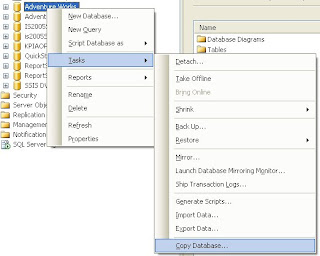
After click on Copy Database.
The Copy Database Wizard opens.
1st step: select the source server and the authentification mode
2nd step: select the destination server and the authentification mode
3rd step: choose the transfer method (Detach-Attach or the SQL Management object method to keep the source db online)
4th step: choose the database to move/copy
5th step: specify file names and wether to overwrite database(s) at the destination
... creation of the package that will copy/move the database
Easy and useful!
Subscribe to:
Posts (Atom)