After 5 years, a select statement on a Oracle 10 database starts to fail...with the error message ORA-01722: Invalid Number.
Hum, strange error message and not really usefull.
I read lots of post and sometimes it was due to an issue with the connector (http://www.attunity.com/forums/microsoft-ssis-oracle-connector/known-limitation-number-fields-1305.html), due to datatype mismatch (http://social.msdn.microsoft.com/Forums/en/sqlintegrationservices/thread/9acb1c36-bfaf-40eb-bb6e-3a91eeea96ec) or due to other reasons.
In my case, the issue cames from a TO_NUMBER casting that we did to convert a string datatype to a number...I know it'sstupid to create keys as string but I'm not responsible of that ;-)
So let's continue the explanation...first I started to execute the query by removing all the selected fields.
The query ran fine.
Than I added, one by one the selected fields till the error occured again. Like this I was able to identify the column that caused the issue.
Second I remarked that I did a conversion using TO_NUMBER...May it be possible that some values in the source database are not numbers?
I executed again the query without converting the values and was able then to see that one row had the value 'PHONECALL' as key number! Very funny. So I have identified the bug.
Now go to the solution...
1) The workaround: adding a selection criteria in the where clause that avoid selecting rows where the values length is smaller than the expected length.
2) The solution: Asking to the DBA to create a function that detect if a value is a number or not like here follow:
CREATE OR REPLACE FUNCTION is_number
( p_str IN VARCHAR2 )
RETURN VARCHAR2
IS
l_num NUMBER;
BEGIN
l_num := to_number( p_str );
RETURN 'Y';
EXCEPTION
RETURN 'N';
END is_number;
Showing posts with label SQL Server 2005. Show all posts
Showing posts with label SQL Server 2005. Show all posts
Thursday, May 31, 2012


Wednesday, May 23, 2012
SSIS vs. SQL Stored Procedure
Recently I was asking by the customer to redesign a sequence of stored procedures that were used to load and transform data. This because the performance was not as expected due to the increasing of the mount of data.
Here the observations I will share with you:
Here the observations I will share with you:
- Use SSIS to extract and load data from one or mutliple sources to one destination or multiple destinations.
- Use a stored procedure to update the data instead of using e.g. a SCD component.
- Use SQL Statement for grouping, filtering or sorting a query result instead of e.g. a Sort component
- If the data to join comes from different sources then extract and load first the data in tables of the same e.g Staging area and then use a SQL Select statement where the join conditions will be indexed.
Thursday, June 19, 2008
SQL Server 2005 :Insert a flat file in a OLTP table
This article will show you 4 different ways to import a flat file in a SQL Server table.
The first question that you must have is:" Have I to manipulate some of my data?"
If no, you can use the following methods:
BULK INSERT
BULK INSERT is a T-SQL command that allows to import data from a flat file into a table.
Here an example:
BULK INSERT
WITH
(
FIELDTERMINATOR = '',
ROWTERMINATOR = '\n'
)
bcp
bcp can copy Microsoft® SQL Server™ data to or from a data file. bcp is a command prompt utility and not a T-SQL command. bcp is used in a batch file or in your .NET application, for instance. The bcp utility is written using the ODBC bulk copy application programming interface (API).
Import/Export Tasks
As the Copy tool of SQL Server 2005, it exists also an import tool in it.
From SSMS, connect you on your destination database (which one that contains the destination table). Right click on this database and select Tasks --> Import Data... The Sql Server Import and Export Wizard window opens itself.
Select Flat File Source as Datasource. Specify the File path and the formatting. You can preview the result in the Columns tab for the columns name and the data in the Preview tab.
Click Next and follow the steps.
if you have a manipulation:
In this case, you will need to use a tool that will make the changes. This tool is SSIS. SSIS is provided with the Developer and Enterprise version of SQL Server 2005.With SSIS you can create a connection to your flat file, make some changes on the values in your DataFlow and importing them in a table thanks to an OLE DB connection.
I hope that this post will help you ...
Monday, May 19, 2008
SSAS 2005 : Aggregation...Important thing to know!
Aggregations are pre-calculated summaries of data. Specifically, an aggregation contains the summarized values of all measures in a measure group by a combination of different attributes.
How aggregations are used ?
To understand aggregations, consider the cube shown in Figure.

This is a small cube consisting of two dimensions, Date and Product, and one measure, Sales Amount.
The cube has three aggregations contributed by different combinations of attribute hierarchies.
How aggregations are used ?
To understand aggregations, consider the cube shown in Figure.
This is a small cube consisting of two dimensions, Date and Product, and one measure, Sales Amount.
The cube has three aggregations contributed by different combinations of attribute hierarchies.
- The all-level aggregation stores the grand total Sales Amount.
- The intermediate aggregation stores the total Sales Amount for the year 2004 and Road Bikes product subcategories.
- Finally, assuming that the fact table references Month and Product dimensions, there is also a fact-level aggregation for July 2004 and product Road-42.
Suppose a query asks for the overall Sales Amount value. The server discovers that this query can be satisfied by the all-level aggregation alone. Rather than having to scan the partition data, the server promptly returns the result from the pre-calculated Sales Amount value taken from this aggregation. Even if there isn't a direct aggregation hit, the server may be able to use intermediate aggregations to derive the result. For example, if the query asks for Sales Amount by product category, the server could use the intermediate aggregation, Year 2004 and Subcategory Road Bikes, to derive the total.
Why not create all possible aggregations?
The short answer is that this will be counter-productive because all those aggregations will require enormous storage space and long processing times. The reason is that aggregations are created when the cube is processed.
Last thing, to help the Aggregation Design Wizard make a correct cost/benefit analysis, be sure to keep the EstimatedCount (attribute property) and EstimatedRows (Measure group property) counts up to date.
To make the good estimation you can use a very useful tool named BIDSHelper .
Tuesday, May 13, 2008
SQL Server 2005 : How to copy a database using SQL Server 2005?
To do this manipulation, you have a lot of way.
Backup-Restore? too long
Create an SSIS package using BIDS? too much manipulation
Backup-Restore? too long
Create an SSIS package using BIDS? too much manipulation
The solution is ...
the integrated copy tool of SQL Server 2005.
This tool can copy one or several OLTP database and "paste" them on a server. It creates a package and launch the SQL server Agent that executes this one.
You can find it by right-clicking on a database in your SSMS.
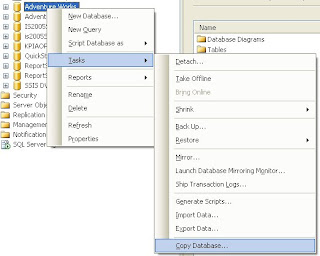
After click on Copy Database.
The Copy Database Wizard opens.
1st step: select the source server and the authentification mode
2nd step: select the destination server and the authentification mode
3rd step: choose the transfer method (Detach-Attach or the SQL Management object method to keep the source db online)
4th step: choose the database to move/copy
5th step: specify file names and wether to overwrite database(s) at the destination
... creation of the package that will copy/move the database
Easy and useful!
Subscribe to:
Posts (Atom)